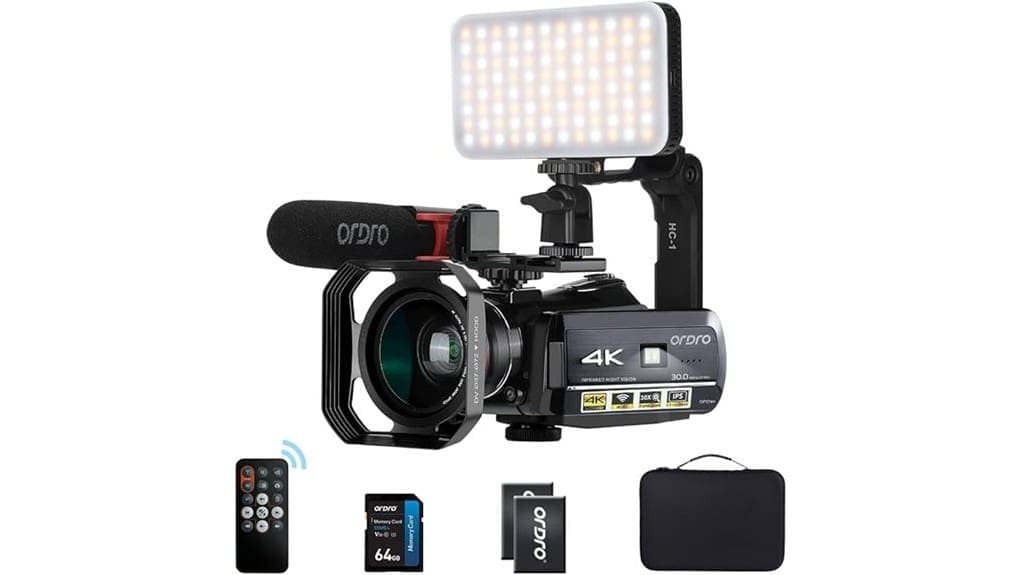
You’ll find the ORDRO HDR-AC3 a pragmatic, pocketable 4K vlogging camcorder that delivers serviceable 4K for web use, useful 1080p/60 for smoother motion, and basic manual controls. It’s compact, includes an LED light, external mic support, dual batteries, and HDMI clean‑output, but its small 1/3″ sensor, digital stabilization, and aggressive denoise limit low‑light and fine detail. It’s ideal for casual creators on a budget—keep going to see specifics on audio, handling, and accessories.
Some Key Takeaways
- Affordable, compact 4K vlogging camcorder with useful features like external mic support, LED light, and dual batteries.
- 4K quality is serviceable for web uploads but uses a small 1/3″ sensor with noise and detail loss at higher ISO or digital zoom.
- 1080p/60 gives cleaner, smoother footage and is preferable for handheld or action shooting.
- Built-in mono super-cardioid mic is decent at short range, but external wireless or dual-system audio is recommended for critical work.
- Lightweight, pocketable body with a rotating touchscreen, hot shoe, and included accessories, though not a replacement for pro rigs.
Verdict: Is the ORDRO HDR-AC3 Worth Buying?
While it won’t replace a professional rig, the ORDRO HDR-AC3 is worth buying if you need an affordable, compact 4K vlogging camcorder with solid feature coverage. You’ll get a clear value proposition: 4K UHD, interchangeable shooting modes, external mic support, LED lighting, and dual batteries in a pocketable body. If your user expectations center on portability, accessory bundle, and basic manual control, it delivers. You won’t get class-leading sensors, optical stabilization, or pro codecs, so manage expectations for demanding productions. For casual creators and budget-conscious vloggers, it’s a pragmatic, feature-rich choice. Many mirrorless camera enthusiasts also appreciate compact accessories and lenses that enhance portability and versatility essential gear.
Real-World Video and Photo Performance (4K, 1080p, Low Light, Stabilization)
Test the ORDRO HDR-AC3 and you’ll find its 4K footage is serviceable for web uploads but falls short of cinematic detail: the Sony IMX258 1/3″ sensor produces acceptable sharpness at 2880×2160/24fps, yet noise and fine-detail loss become noticeable beyond ISO-equivalent thresholds and during aggressive digital zoom. 1080p/60 delivers smoother motion and cleaner low‑ISO results, so you’ll prefer it for handheld or action. Low light exposes grain, muted dynamic color and aggressive denoise. Stabilization is purely digital—effective for mild shake but not pans; rolling shutter skew appears on fast motion, so use a tripod. For underwater or wet-weather shooting, pair the camera with a purpose-built waterproof housing to protect it and maintain functionality.
Audio, Mic Options, and Onboard Recording Quality
Listen closely: the ORDRO HDR-AC3 records usable on-camera audio for casual vlogs but you’ll notice limitations if you need broadcast‑quality sound. You get a built-in mono mic with super-cardioid pattern that captures clear dialogue at short range but picks up room tone and handling noise. The hot shoe and included mic let you attach improved mics or route to external recorders via the 1-to-2 USB/mic adapter; latency and format constraints mean you’ll likely prefer dual-system recording for critical work. Wind protection is minimal on the stock mic, so add a deadcat or external windscreen outdoors. For photographers pairing sound and stills, consider a compatible wireless microphone system to keep audio and camera mobility seamless.
Handling, Screen, Controls, and Build for Vlogging and Travel
Usually, you’ll find the ORDRO HDR-AC3 easy to operate on the go: its 3.1″ capacitive IPS touchscreen rotates 270° for vlogging and framing, touch controls respond quickly, and the compact 5″×2.7″×2.7″ body plus 0.9 lb weight make handheld shooting manageable. You’ll appreciate compact ergonomics: thumb-accessible buttons, a secure grip, and a hot shoe for microphone or LED. The touchscreen responsiveness speeds menu navigation and focus checks, though some gestures feel sensitive. Build quality is lightweight plastic but solid for travel; hinge stiffness holds angles. Controls are logical; setup is straightforward for quick run‑and‑gun shoots. Consider adding a dedicated video light to improve subject illumination for vlogging and travel shoots.
Battery Life, Charging, and Recording‑While‑Charging Practicalities
Measuring roughly two hours per charge with the included pair of 3.7V 1700 mAh NP-120 batteries, the ORDRO HDR-AC3 gives you predictable runtime for short shoots but you’ll need spares for longer days. You’ll plan battery preservation: keep spare NP-120 cells cool, rested, and rotated. The camera supports recording while charging, but observe charging safety—use supplied charger and avoid high temperatures. You can’t rely on internal hot swappable batteries without powering down to swap; treat swaps as planned breaks. Use deliberate power management: lower display brightness, disable Wi‑Fi, and schedule charging windows to maximize uptime. Keep shooting longer by stocking the right spare batteries and chargers for spare camera batteries.
Accessories, Connectivity, and Workflow (LED Light, Mic, Wi‑Fi, HDMI, SD)
With the ORDRO HDR-AC3, you get a complete on‑camera toolkit that keeps shoots compact and functional: the 96‑LED adjustable light and lens hood manage exposure in mixed lighting, the external super‑cardioid mic mounts to the hot shoe for cleaner, directional audio, and the included cables and card reader streamline file offloads. You’ll control LED positioning for fill or eye‑light; the mic’s low‑cut reduces handling noise. Wi‑Fi lets you preview and trigger recordings within ~9.8 ft, not as robust as router tethering. HDMI clean output and micro USB/SD workflow support fast File transfer and edit-ready MP4s. For hobbyist photographers and vloggers, pairing the camcorder with a dedicated ring light setup can significantly improve portrait and product shots.
Who Should Buy the ORDRO HDR-AC3 and Best Alternatives to Consider
The LED, mic, and HDMI features make the HDR-AC3 a compact, ready-to-shoot kit, but who should actually pick this camcorder? You should consider it if you’re a budget creators-focused vlogger, student filmmaker, or event recorder who needs 4K capture, external audio, and on-camera lighting without bulky rigs. It suits run-and-gun setups and basic action filming when paired with a stabilizing mount, but lacks optical stabilization and weather sealing. Alternatives: entry-level mirrorless (better low-light, optical IS), rugged action cams (waterproof, superior stabilization), and compact camcorders with true optical zoom for more demanding shoots. This makes it a good match for creators who benefit from integrated on-camera LED accessories and prefer minimal extra gear.
Some Questions Answered
Does It Support External Power Banks Without Overheating?
Yes — you can use external power banks via USB while recording, but monitor temps closely: power passthrough lets the camcorder record while charging, yet battery overheating can occur if you use high-output banks or charge and discharge simultaneously. I’d avoid cheap fast-charge banks, keep vents clear, and use moderate current (5V/2A). If the camera feels hot, stop and let it cool to prevent thermal stress and reduce overheating risk.
Can It Function as a Webcam via USB?
Yes — you can use it as a USB webcam for Live streaming, but it’s limited. You’ll connect via USB and HDMI output; Windows recognizes it for capture with compatible software, though native USB webcam drivers aren’t guaranteed. Expect lower latency with HDMI-to-USB capture devices. Image quality and stability depend on settings, battery/charging and Wi‑Fi disabled. For reliable USB webcam Live streaming, use an HDMI capture dongle and test resolution/frame rate beforehand.
Is There a Microphone Windscreen Included?
No, a foam windscreen isn’t included with the mic kit; you’ll get the external mono microphone, hot shoe bracket, and a 1-to-2 USB/mic adapter. You’ll want to add your own foam windscreen or furry windshield for outdoor use to reduce wind noise. It’s a straightforward upgrade, compatible with the mic’s standard capsule size, and will noticeably improve audio clarity in breezy conditions.
Are Firmware Updates Available From the Manufacturer?
Yes — firmware availability exists but is limited. You’ll need to check ORDRO’s support site or contact their support for the latest firmware and detailed update process. Expect manual download of a firmware file, transfer to the SD card or connect via USB, then follow on-screen or PDF instructions to install. Be cautious: follow steps precisely, back up settings, and make certain full battery to avoid bricking the camera.
Can It Record in a Loop for Dashcam Use?
No, it doesn’t natively support loop recording or a dedicated parking mode. You can’t rely on continuous overwrite or automatic motion-triggered parking features. However, you can approximate loop behavior by using timed recording segments and a large SD card, then manually deleting old files. For parking monitoring you’d need external power and manual motion detection setup; the camera’s firmware doesn’t provide built-in parking-mode recording or automated loop overwrite.