You’ll get rock‑steady HyperSmooth 6.0 stabilization, 27MP photos and up to 5.3K60 video for crisp reframing, plus GP‑Log, HLG and timecode sync for pro workflows. Low‑light holds usable detail, colors are natural, and Action Mode tightens fast pans. Enduro battery gives ~1.5 hours at 5.3K; the magnesium shell is waterproof to 10 m and the 50‑in‑1 kit covers most mounts. Keep going and you’ll find hands‑on tips, workflow notes, and buying advice.
Some Key Takeaways
- Exceptional stabilization (HyperSmooth 6.0 with AutoBoost and 360° Horizon Lock) delivers rock‑steady footage for walking, biking, and handheld runs.
- 27MP sensor and 5.3K60 capture fine detail and allow useful reframing while supporting 4K120 and 2.7K240 slow motion.
- GP‑Log, HDR, and HLG offer flexible color workflows for grading or quick delivery, respectively.
- Enduro 1900 mAh battery provides about 1.5 hours at 5.3K; runtime drops with higher frame rates and AutoBoost.
- Magnesium‑reinforced, waterproof (10 m) shell plus extensive mounts make it ideal for adventure vloggers and pro workflows.
Verdict and Key Specs at a Glance
While the HERO13 Black builds on GoPro’s strengths, it’s a meaningful step if you want higher resolution, smoother stabilization, and more versatile mounting options. You get 27MP photos, up to 5.3K60 video, HyperSmooth 6.0, Enduro battery, waterproofing to 10m, and multicam/timecode sync—compact, rugged, and ready. Check price comparison against prior HERO models and competitor action cams to see value; bundle accessories can tilt the math. Read user testimonials for real-world durability, battery behavior, and accessory fit. Verdict: you’ll appreciate the spec bump and ecosystem if you need pro-level capture in a handheld form. Capture stunning aerial shots with compatible drones for high-resolution perspectives using 4K camera drones.
Real‑World Video and Photo Performance (Stabilization, Low Light, Resolution)
Put the HERO13 Black to work and you’ll quickly see where its real‑world strengths lie: HyperSmooth 6.0 with AutoBoost and 360° Horizon Lock delivers rock‑steady footage across walking, biking, and handheld runs, while the 27MP sensor and 5.3K60 capture preserve fine detail and allow useful reframing. You’ll notice minimal motion blur even on fast pans, and Action Mode keeps stabilization tight without smearing. Low‑light shots retain usable detail; noise rises but HDR/HLG help protect highlights and shadows. Color fidelity is strong straight from camera, rendering natural skin tones and saturated landscapes that need little correction. The HERO13 Black is also a compact option for creators looking to pair action footage with FPV drone aerials for dynamic storytelling.
Modes, Codecs, and Workflow: GP‑Log, HDR, Frame Rates, and Editing
If you want maximum post‑production flexibility, GP‑Log is the place to start: it captures a flatter, wider dynamic range than standard HDR or HLG, so you can pull shadows and tame highlights without crushing midtones. You’ll shoot MP4 at up to 5.3K60, 4K120, or 2.7K240 for slow‑motion. Choose HDR for quick, punchy delivery; HLG for simpler broadcast workflow. For grading, expose conservatively and target LUTs designed for GP‑Log. Mind file management: large 5.3K files demand fast microSD and strict folder organization. Use Quik or NLEs that preserve color metadata for best results. Consider pairing your HERO13 with GoPro mounts that keep the camera stable and properly framed for cleaner, more usable footage.
Battery Life, Durability, Mounts, and Included 50‑in‑1 Accessories
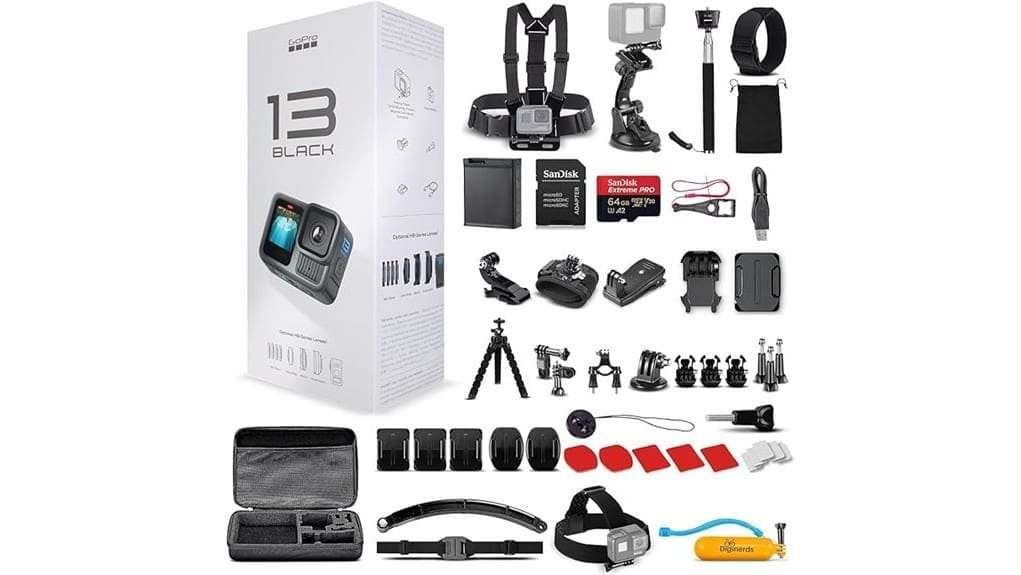
Usually you’ll get solid runtime from the HERO13 Black’s 1900 mAh Enduro battery — roughly 1.5 hours at 5.3K — but actual life varies with resolution, frame rate, stabilization, and wireless use, so plan for shorter sessions when shooting 4K120, using HyperSmooth AutoBoost, or streaming. You’ll appreciate Long term endurance with spare Enduro batteries for daylong shoots; manage settings and carry a charger. The magnesium-reinforced shell survives drops and is waterproof to 10 m without housing. Mount compatibility is excellent: the included 50‑in‑1 kit and standard GoPro mounts cover helmets, bars, chest rigs, suction, and tripods. Consider pairing the camera with float grips to reduce the risk of drops and improve handling during water and action shoots.
Who Should Buy the HERO13 Black and Best Buying Options
While the HERO13 Black packs pro-level specs like 5.3K60, HyperSmooth 6.0, and a 27MP sensor, you should buy it only if you need top-tier stabilization, versatile mounting, and advanced capture modes for action, vlogging, or multicam workflows. If you’re an adventure vlogger who demands reliable waterproofing, horizon lock, and multicam Timecode Sync, this is a clear fit. Smartphone alternative buyers who want superior frame rates, log profiles, and compact durability will appreciate it. Choose official bundles for batteries and mounts, or the 50‑in‑1 kit for immediate versatility. Skip it if you only need casual smartphone clips. For extended outings, pair the HERO13 Black with portable power solutions like high-capacity camera power banks to keep shooting all day and night without missing a moment, especially when you need reliable on-the-go power.
Some Questions Answered
Does the HERO13 Support External Microphones via USB-C Adapter?
Yes — you can use an external mic with the HERO13 via a USB C adapter. You’ll need a compatible USB‑C to 3.5mm adapter or GoPro Pro 3.5mm mic adapter; check adapter compatibility and camera firmware. You’ll get better wind reduction using a proper external mic with a furry windscreen and the camera’s wind‑reduction settings. Test levels and monitor audio via Bluetooth or Quik to confirm clean capture before critical shoots.
Can I Use the Camera as a Webcam Over Wired USB?
Yes — you can use it as a USB webcam for a wired livestream. Connect the camera to your computer via USB‑C, enable webcam mode, and the system will recognize a USB webcam device. You’ll get clean 1080p (or higher, depending on drivers), low‑latency feed suitable for streaming or conferencing. You’ll want GoPro Quik or compatible drivers, a charged battery or external power, and stable USB 3.0/USB‑C connection for best results.
Is There Removable ND Filter or Lens Cap Included?
No — the package doesn’t include a removable lens or ND insert. You get the camera with an Enduro battery, mounts, USB‑C cable and optional bundle accessories, but no detachable lens cap or neutral density insert. If you need ND filtration or protective caps, you’ll have to buy third‑party removable lens/ND insert accessories or compatible HB‑series lens mods. Check compatibility and mounts before buying to guarantee secure fit and retained stabilization.
How Does the Camera Handle Timecode Sync With Multiple Units?
You sync timecode across multiple units using the HERO13’s Timecode Sync feature; you’ll enable it in the camera or Quik app and start recording to align clips. Your timecode workflow is automated for multicam edits, minimizing manual alignment. There aren’t traditional genlock options — you won’t get hardware sync — so rely on timecode and software syncing. Test units together beforehand to verify consistent timestamps and battery life.
Are Firmware Updates Downloadable via Wi‑Fi or Only Through Quik?
You can download firmware updates via Wi‑Fi or through the Quik app; you’re not limited to one method. If your camera’s online, it’ll fetch wifi updates directly and prompt you for paired installation when connected to your phone or computer. Using Quik gives you a desktop/mobile workflow with progress info and backup options. Choose wifi updates for on-device convenience or Quik for a controlled, paired installation and file management.