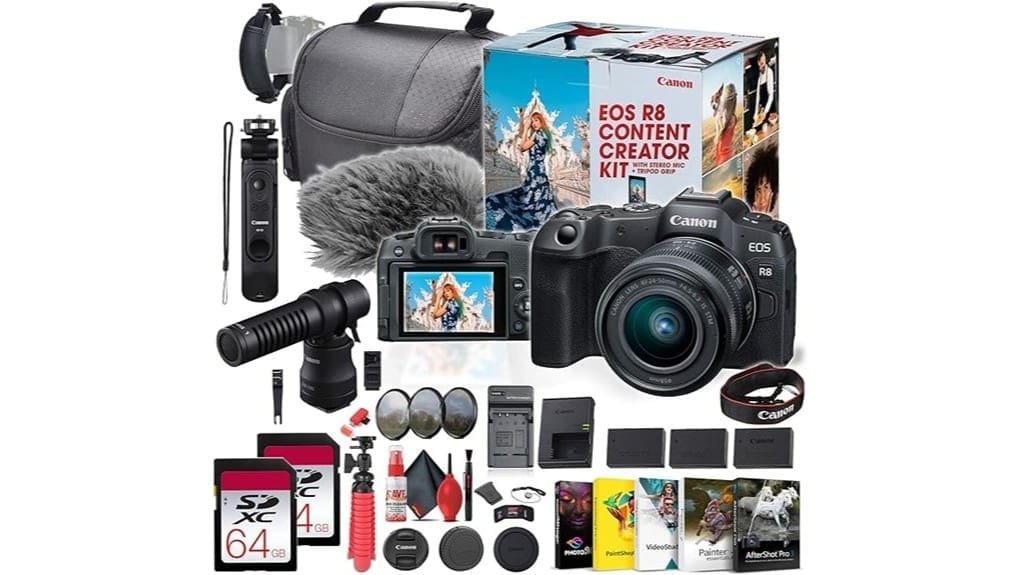
You’ll get a lightweight full‑frame kit tailored for handheld vlogging and social video, offering oversampled 4K/60p, Dual Pixel CMOS AF II with reliable subject and eye tracking, and a compact stabilized RF 24–50mm lens for 24–75mm equivalent coverage. The bundle includes a directional DM‑E100 mic, dual LPE17 batteries, tripod grip and accessories for fast setup. Expect solid low‑light performance to ISO 6400–12800 and short battery swaps during long 4K captures — keep going to see detailed tests and workflow tips.
Some Key Takeaways
- Compact full-frame R8 kit excels for handheld vlogging and travel with stabilized 24–50mm lens and dual batteries for extended use.
- DIGIC X and Dual Pixel CMOS AF II deliver fast, reliable autofocus and smooth subject/eye tracking for dynamic content.
- Oversampled 4K up to 60p produces sharp footage, though 4K60 shows more rolling-shutter during fast pans.
- Included DM‑E100 directional mic, tripod grip, and software bundle make it ready-to-shoot for podcasters and creators.
- Main drawbacks: limited battery runtime per cell, no weather sealing, single micro‑HDMI port, and modest telephoto reach.
Who This Canon EOS R8 Content Creator Kit Is Best For
If you’re building a streamlined creator workflow, the Canon EOS R8 Content Creator Kit fits people who need a lightweight, full‑frame camera that’s tuned for social video and handheld vlogging. You’ll appreciate its compact ergonomics, vertical movie mode, and built‑in connectivity that speed setup. Beginner vloggers get intuitive AF and ready‑to‑shoot accessories; travel influencers benefit from small size, stabilized 24–50mm range, and dual batteries. Studio podcasters can rely on the included directional mic and software bundle for efficient postproduction. Action shooters will like fast DIGIC X processing, Dual Pixel AF II, and 4K up to 60p capture for sharp motion. The kit also includes essential gear for mirrorless enthusiasts, making it easy to expand your setup over time.
Quick Specs Snapshot: What Matters for Creators
While you’ll want to dig into full specs later, these are the quick technical touchpoints creators need to know: a 24.2MP full‑frame sensor with DIGIC X delivering 4K/60p oversampled video, Dual Pixel CMOS AF II with 100 AF points for reliable subject tracking, RF 24–50mm f/4.5–6.3 IS STM providing compact stabilized coverage, Micro HDMI output plus Wi‑Fi/Bluetooth for live streaming and wireless control, and a kit that includes dual LPE17 batteries, a directional DM‑E100 mic, and handheld/tripod support to keep shoots uninterrupted.
You’ll appreciate balanced ergonomics tips: light body, intuitive dials, vertical movie mode. Expect clean files for color grading, reliable audio syncing via timecode-friendly mic and stable frame delivery. Ignore battery myths; dual LPE17s and the external charger cover long sessions. Consider adding a top handle for better camera grip and comfort during handheld shoots.
Real-World Video Performance and Stabilization Tests
Now that you’ve seen the quick specs, let’s test how the R8 actually performs on set. You’ll evaluate handheld, tripod, HG-100TBR grip, and gimbal comparisons to quantify stabilization. In handheld runs the lens IS + sensor crop reduce shake; gimbals still deliver smoother pans and steadier motion. Check rolling shutter during fast pans—minimal skew at 4K30, more apparent at 60p. Recordings retain clean chroma for color grading, responding well to moderate correction. Test varied bitrates: higher bitrate reduces compression artifacts and preserves highlight roll for grading; low bitrate shows blockiness in complex motion. For shooters focusing on cinematic movement, pairing the R8 with a quality gimbal stabilizer yields the most professional-looking tracking shots.
Autofocus, Image Quality, and Low-Light Shooting Results
Because Canon’s Dual Pixel CMOS AF II pairs fast phase-detection with DIGIC X processing, you get reliable subject acquisition and smooth tracking across stills and video without hunting or jitter. You’ll notice Fast AF responsiveness in AF-C, maintaining lock on moving subjects and smooth shifts for handheld vlogging. Eye Tracking performs consistently for human and animal subjects, simplifying framing during dynamic shoots. Image quality yields clean 24.2MP RAW files with accurate color and good detail. In Low Light the sensor and DIGIC X balance exposure, though Noise Handling becomes aggressive at high ISOs; expect usable results to ISO 6400–12800 with controlled grain. Tripod heads designed for content creators can help stabilize framing and enable smoother pans for video, especially when paired with a fluid head.
Bundled Lens, Mic, and Accessories : What You Actually Get
When you unpack the Canon EOS R8 Content Creator Kit, you get a ready-to-shoot package built around the RF 24-50mm f/4.5–6.3 IS STM lens, a DM-E100 directional microphone, a HG-100TBR tripod grip plus a 12-inch flexible tripod, two LPE17 batteries with external charger, dual 64GB SD cards, and a tidy set of accessories (micro HDMI cable, card reader, cleaning kit, strap, soft case, and 58mm filters) that remove most setup friction for vlogging and short-form production. The kit minimizes setup time and covers audio, stabilization, power, and storage. Build quality is average; check accessory durability for heavy field use. Keep shooting is a helpful reminder to have spare camera battery options on hand to avoid interruptions.
Day-to-Day Workflow: Battery Life, File Handling, and Connectivity
Plan your shooting day around the dual-battery setup: the two included LPE17s (2260 mAh) will let you shoot intermittently for extended sessions but expect to swap or recharge for continuous 4K/60p recording. You’ll implement strict battery management: carry both spares, use airplane mode, and prioritize external charger during breaks. File organization starts in-camera—set clear folder naming, record RAW+JPEG selectively, and use the two 64GB cards for overflow or dual-record redundancy. Connect via Wi‑Fi/Bluetooth for quick transfers, or use the micro HDMI and supplied card reader for high‑speed offload to desktop for editing and backup. Consider battery choices and accessories from a site focused on camera batteries to perfect your workflow.
Pros, Cons, and Buy-or-Skip Verdict for Content Creators
If you’re producing fast-paced social videos or streaming, the EOS R8 gives you a compact, full-frame package that balances high-quality 4K/60p capture, reliable Dual Pixel CMOS AF II, and a lightweight body that’s easy to handheld or mount on a grip. Pros: excellent AF, oversampled 4K clarity, bundled mic/grip, two spare LPE17 batteries and external charger ease battery charging, RF 24–50 lens keeps kit compact, strong accessory compatibility. Cons: no weather sealing, limited battery runtime per cell, single micro‑HDMI port, modest tele reach. Verdict: buy if you prioritize size, autofocus, and workflow-ready kit; skip if you need rugged or long-end zoom. Many DSLR enthusiasts will appreciate the kit’s range of essential gear compatible with DSLR cameras and accessories.
Some Questions Answered
Can I Use Third‑Party RF Lenses With Full Functionality?
Yes — you can use many third‑party RF lenses, but Lens compatibility and Autofocus performance vary. You’ll get native electronic control, EXIF, and stabilization when the lens supports RF protocols, yet some brands/models may need firmware updates or adapters for full functionality. Autofocus performance can be excellent with modern third‑party RF designs, but older or adapted lenses may show slower AF-C tracking, limited face/eye detection, or occasional calibration issues.
Is In‑Body Image Stabilization (IBIS) Available?
No — IBIS absence is real on this body. You’ll rely on Stabilization alternatives: the kit’s RF 24‑50mm lens optical IS, electronic stabilization in video, lens-based IS combinations, and support gear (tripod grip, 12″ flexible tripod, gimbals). For handheld low‑light stills or fast action, expect limitations; use faster shutter, higher ISO, stabilized lenses, or external gimbals to achieve steady results and preserve image quality.
Does the Kit Support Clean HDMI Output for Streaming?
Yes — you’ll get clean HDMI output for live streaming. The kit’s Micro HDMI port supports uncompressed video output without on‑screen overlays, letting you feed 4K/60p (or lower frame rates) to capture cards or switchers. Use the camera’s HDMI settings and disable display overlays to guarantee a clean feed. Your streaming software or hardware receives a direct, high‑quality signal suitable for professional live streaming workflows.
Are Vertical Video Files Automatically Rotated for Phones?
Yes — the camera embeds vertical metadata so phone playback apps can auto-rotate files. You’ll record in vertical movie mode and the file’s orientation flag is set in the video container, enabling compatible phones and players to display upright without manual rotation. Some older or non-conformant apps might ignore the metadata, so you should test target devices; rewrap or transcode if an app fails to honor the orientation flag.
Can the Camera Record Unlimited 4K Takes Without Overheating?
No — you can’t record unlimited 4K takes without thermal throttling and recording limits. The R8 will hit internal temperature thresholds during extended 4K60/oversampled capture and may stop recording, shorten clip duration, or reduce performance to protect components. You should plan timed takes, use external recorders, limit continuous 4K60 sessions, or employ airflow/power strategies to mitigate thermal throttling and extend practical recording limits.